What Is the Scoopz App and Is It Safe for Kids?
The Scoopz app is a short video app built around real-life clips and communities called Circles. Is Scoopz safe for kids? Its terms require users to be 18+. Here's what parents should know about its age rating, content, DMs, data and money, and how to block it on Android and iPhone.

The Scoopz app is a free short video app where people post real-life clips into topic communities called Circles, comment on them, and message each other. Is Scoopz safe for kids? It isn't built for them: its own Terms of Service say users must be 18 or older, the U.S. App Store rates it 18+, and the top Circles on its website include Bodycam, FightCam and PublicFreakout. This Scoopz app review for parents covers the age rating, the main risks, and how to block or limit it on Android and iPhone.
What is Scoopz?
Scoopz calls itself a social video app for people who want to share "true, unscripted stories." It is made by Local AI, Inc., a company based in Mountain View, California. On Google Play it appears as Scoopz: Real Life, Real Videos, with 10M+ downloads; on the App Store it's Scoopz: Your People Your Video.
If your child calls it "like TikTok," that's a fair first impression: it's a feed of short videos. What Scoopz stresses is authentic, everyday footage — local news, sports, gaming, hobbies and more — organized into communities.
How Scoopz works
- Circles. The feed is built from the topic communities a user joins. Users can post straight into a Circle or start a new one.
- For You feed and Challenges. The app suggests clips it expects you to like, and Challenges are timely prompts for people to film a video.
- Posting. Clips can be up to 3 minutes long, filmed in the app or taken from the camera roll.
- Comments and direct messages. Viewers can comment (with GIFs) and send private messages.
- Mini Drama. Short drama series where some episodes unlock by watching an ad or through a paywall.
- Creator earnings. Creators accepted into the Creator Fund can earn money from their videos; Scoopz's creator page also mentions tips, ads and referrals.
Scoopz also has a website that shows Circles and trending clips, so the app isn't the only way in.
Scoopz age rating
Every official source puts Scoopz in the adult or near-adult range:
| Source | What it says |
|---|---|
| Scoopz Terms of Service | Users must be 18 or older; anyone in the U.S. under 18 may not use the service |
| App Store (U.S.) | 18+; frequent realistic violence; infrequent profanity, mature or suggestive themes, horror, drug and alcohol references, guns; contains messaging and chat, user-generated content and advertising |
| Google Play (U.S.) | Mature 17+; "Users Interact" |
| Creator Fund and creator tips | 18 or older; the Creator Fund also requires being in the U.S. |
You can read the age rule in the Scoopz Terms of Service. Google Play's Mature 17+ is the store's content rating, not Scoopz's own minimum age. The Terms don't describe how age is checked at sign-up, and we found no mention of parental controls, teen accounts or a private-profile mode in Scoopz's terms, privacy policy or community guidelines. If you know someone under 18 has an account, the Terms say you can report it to [email protected].
Is Scoopz safe? Risks for kids
For kids and teens, the short answer is no. Here are the four areas that matter most:
| Risk | What we found | Why it matters for kids |
|---|---|---|
| Content | Large Circles built around police bodycam footage, fights, public confrontations and true crime | Clips of real violence can be upsetting, and a short-video feed makes it easy to keep watching |
| Strangers | Public comments and direct messages | Strangers may be able to contact a child in comments or private messages |
| Data | App Store privacy label lists location and identifiers as "Data Used to Track You" | A child's habits and location can feed ad targeting |
| Money | Mini Drama episodes behind ads or a paywall; creator payouts tied to followers and views | Spending pressure, and an incentive to chase views |
Content and moderation
Scoopz's community guidelines ban nudity, sexual solicitation, bullying, hate, and content promoting self-harm, suicide or eating disorders. Violence is treated differently: violent-crime footage is allowed when the incident is "newsworthy," and gory content is banned only when it's meant purely to shock and has no news value. The Terms add that Scoopz has no obligation to proactively monitor all content, so a lot depends on users reporting posts.
Strangers, comments and DMs
Comments are public, and the app has direct messages, which Scoopz says can be turned off. As we suggest in our Telegram guide for parents, talk with your child about what to do if a stranger gets friendly fast or asks for photos. If an adult sends your child sexual messages or asks for images, report the account in the app and to the NCMEC CyberTipline (1-800-843-5678). Make sure your child knows they won't be in trouble for telling you.
Privacy and data
The Scoopz privacy policy says the app asks for precise location (but doesn't keep it), collects birth year, device IDs and posted content, and shares some data with advertising and marketing partners. Videos a teen posts can also reveal a school, street or home.
Money and rewards
Scoopz is free to download but carries ads, and its update notes describe Mini Drama episodes that unlock "via ads or paywall," plus a reward-ad option. Getting paid is adults-only: the Video Monetization Policy requires creators to be at least 18 and located in the U.S., with at least 3,000 followers and 100,000 qualified views in the last 30 days. A teen who hears "you can get paid on Scoopz" may not realize they can't qualify.
Settings to make Scoopz safer
If an older teen in your family uses Scoopz anyway, these are the protections Scoopz itself documents. They reduce risk; they don't make it a kids' app.
- Turn off direct messages. Scoopz's update notes say DMs can be switched off in Privacy Settings.
- Report and block. Every post has a Report option, and the app's update notes mention blocking and account safety controls.
- Search controls. Settings let users fine-tune search results and suggestions.
- Do Not Sell or Share My Personal Information. This opt-out limits the sale or sharing of personal data; Scoopz says it doesn't mean you'll stop seeing all ads.
- Location. Deny location access in the phone's settings. On Android, Family Link lets you turn off an app's permissions, such as location, under App details > Permissions.
- Delete the account. The privacy policy says accounts can be deleted from user settings or by writing to [email protected].
How to block or limit Scoopz
Blocking works best alongside a calm conversation. Ask what your child likes about Scoopz and which Circles they follow, then set limits you both know about.
On Android with Google Family Link
- Open the Family Link app and select your child.
- Tap Screen time, then Time limits, then App limits.
- Select Scoopz, tap the Allowed toggle so it switches to Blocked, then tap Done. To allow it for a set time instead, choose Set limit.
- To control new downloads, go to Controls > Google Play, set Apps & games, Movies, and TV to Teen or lower (Scoopz is rated Mature 17+), and under Purchases & download approvals choose Require approval for > All content.
Rating filters don't remove apps installed earlier, which is why step 3 matters. See Google's guide to managing your child's Google Play apps, or our comparison of the best app blockers for Android.
On iPhone with Screen Time
- On your iPhone, open Settings, tap Family, then your child's name.
- Tap Apps & Websites (enter your passcode if asked), select Scoopz, tap Block App and confirm. The icon stays on your child's Home Screen, dimmed.
- To control new downloads, go to Apps & Websites > Restrictions > Ask to Buy and turn on Require Purchase Approval, or set App Store > Installing Apps to Blocked.
- For a time budget instead of a block, use Time Allowances for categories like Social Media and Entertainment (the App Store lists Scoopz under Entertainment).
These steps are for Apple's newest parental controls, which need every device in your Family Sharing group on version 27 software. Otherwise you can keep the previous version of Screen Time, where the steps differ (see Apple's parental controls guide).
On Android phones and Macs with KidInspector
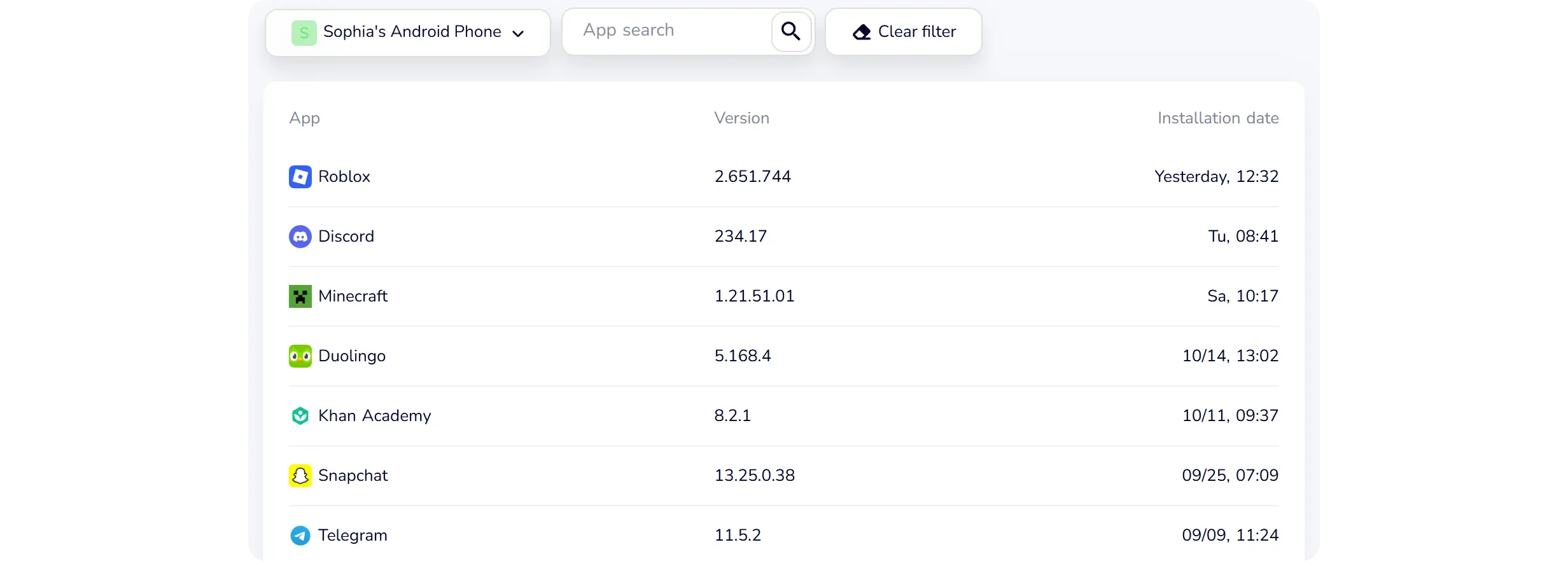
KidInspector lists the apps installed on your child's Android phone, so you can spot Scoopz even if it's tucked away (here's how to find hidden apps on Android). It also shows time spent in each app, so you can check screen time on Android before deciding. If you block Scoopz on Android or Mac, attempts to open it appear in a log, and the Scoopz website can be blocked too. Use it openly: tell your child it's there and why.
See how much time Scoopz really takes
KidInspector shows time spent in each app on your child's Android phone and can block Scoopz on Android and Mac, with a log of attempts to open it. Demo opens without sign-up.
FAQ
No. It's a separate app from Local AI, Inc. It looks similar, but it's organized around Circles, leans toward real-life footage, and requires users to be 18 or older.
Adults. The Scoopz Terms of Service require users to be 18 or older, the App Store rates it 18+, and Google Play rates it Mature 17+.
No. The Creator Fund and creator tips are open to people 18 and older, and the Creator Fund also requires being located in the U.S. and meeting follower and view minimums.
We found none described in Scoopz's terms, privacy policy or community guidelines. Use device-level tools such as Google Family Link, Apple Screen Time or a parental control app.
It's free and supported by ads, but its update notes say Mini Drama episodes can unlock through ads or a paywall. Purchase approvals (Family Link on Android, Ask to Buy on iPhone) help keep spending in your hands.
Know which apps are on your child's devices
One web dashboard shows installed apps, time in apps and visited websites on your child's Android phone, Windows PC or Mac. Creating an account is free.