Best Family Tracking Apps (Free and Paid)

Looking for the best family tracking app, free or paid? We compare Google Family Link, Apple Find My, Google Maps location sharing, Find Hub, Life360, Qustodio and KidInspector by location history, devices covered, openness and price.

The best family tracking app for free depends on your phones: Google Family Link suits parents of kids with Android phones, Apple Find My is the natural pick for all-Apple families, and Google Maps location sharing works across Android and iPhone. If you want more than a dot on a map, a paid app adds longer location history, place alerts or, in KidInspector's case, the child's app and website activity in the same dashboard.
Below we compare seven family locator apps, free and paid, by what they really do: whether they show where someone is right now or where they have been, which devices they cover, how open they are with the person being located and what they cost for the number of devices you have. We checked the developers' sites and help pages for every feature and price.
See a child's location history next to their app and website activity
Open the KidInspector demo and look at the route map and activity reports the way a parent sees them. Demo opens without sign-up.
How we chose: what to look for in a family tracking app
"Family tracking" covers very different tools, from a one-hour location share with a friend to full parental control. These are the criteria we used to rank the apps.
- Live location or location history. Some apps show where a phone is right now; others keep a record of where it has been and draw it as a route. For a child who walks home alone, the current position matters. For understanding a teenager's week, a history is often more useful than checking a live map ten times a day.
- Location plus activity in one place. Where your child is answers only part of the question. If you also want to see which apps take up their evenings and which websites they visit, an app that puts location and activity in one dashboard saves you juggling three tools.
- Phone and computer. Many kids spend as much time on a laptop as on a phone. Most locator apps cover phones only, so check whether the app also works on Windows or Mac if that matters to you.
- Openness with the child or family member. Good tools are designed to be used with the other person's knowledge: they show a notice, send an email or require the person to accept sharing. Avoid anything sold as invisible.
- Price per device count. A low monthly price can add up once you count every phone and computer in the house. Look at how many devices a plan covers, not just the headline number.
- Extras you may or may not need. Place alerts (also called geofences) tell you when someone arrives at or leaves a place. Some paid apps add SOS buttons, crash detection or low-battery alerts. Useful, but only worth paying for if you will actually use them.
Best family tracking apps, ranked
The ranking mixes free tools built into Android and iPhone with paid apps. KidInspector is our own product, so we put it first with that disclosure and list its limits as plainly as everyone else's. If you only need to share locations between adults, skip to the free options: they may be all you need.
1. KidInspector: location history plus app and website activity
Best for: parents who want to see where their child's Android phone or Mac has been, together with what the child does on their phone and computer.
KidInspector is parental-control software for Android phones, Windows PCs and Macs. On Android and Mac it shows location history as a route on a map, so you can see where the device has been during the day. In the same web dashboard you see time spent in apps (including messengers on Android), visited websites, the list of installed apps with install dates, screenshots, and calls and SMS on Android. You can also block apps and websites on Android and Mac and websites on Windows, and the reports show attempts to open something blocked. If you are comparing blockers, our guide to the best app blockers for Android goes deeper, and the install-date list helps if you need to find hidden apps on Android.
Use it openly: tell your child it is installed and why, and agree on what you will look at.
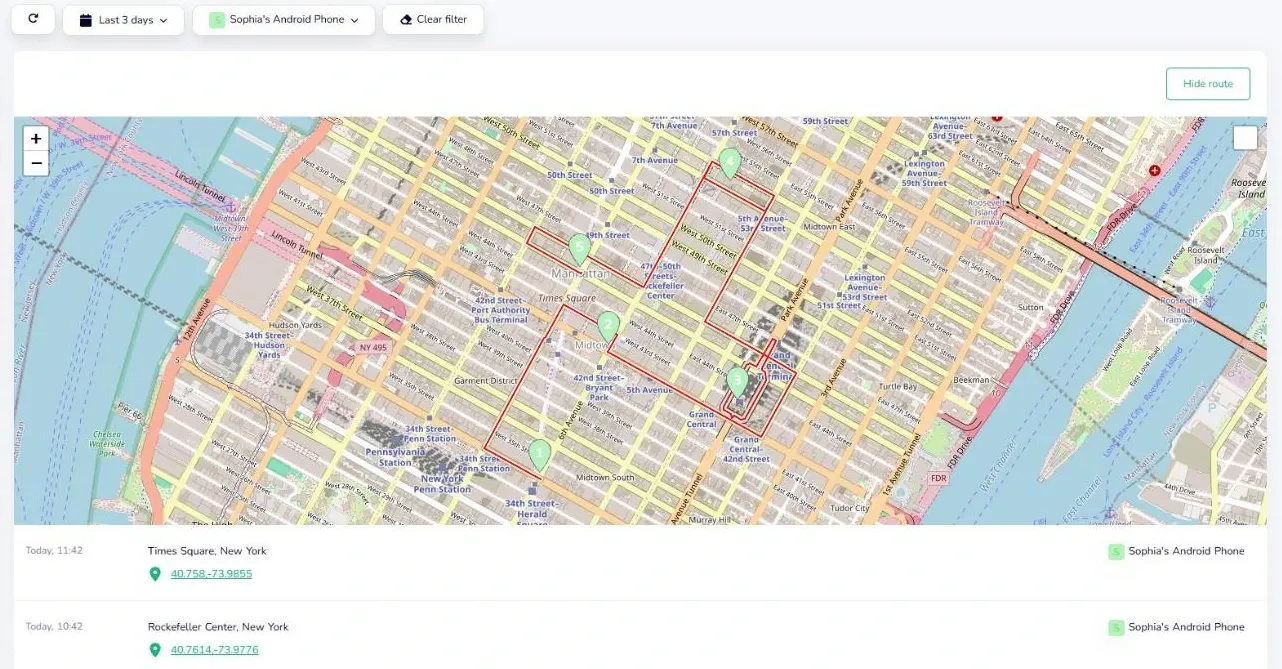
Price: Single plan $79.99/year for up to 3 devices; Family plan $89.99/year for up to 10 devices. Creating an account is free, and you can try a live demo without signing up. Details are on the KidInspector pricing page.
Pros: location history and app/website activity in one dashboard; covers Android phones, Windows PCs and Macs; one yearly price covers several devices; demo without sign-up.
Cons: no iPhone support; shows location history rather than live tracking; no place alerts; built for parents and children, not for adults sharing locations with each other.
One dashboard for your child's phone and computer
Set up KidInspector on an Android phone, Windows PC or Mac and check location history, apps and websites from any browser. Creating an account is free.
2. Google Family Link: free location for kids with Android phones
Best for: parents of younger children who use an Android phone with a supervised Google Account.
Family Link lets you find your child's Android device (or a compatible Fitbit) on a map and set up family places with alerts when your child arrives or leaves. Google notes that the device has to be switched on, online and recently used, and that it can take some time to find the location. The parent app runs on Android, iPhone and iPad, but the child's device must be Android, a Chromebook or a compatible Fitbit; iPhones can't be supervised. Google explains the setup in its help article on finding your child's device location.
Price: free; Google lists no subscription for it.
Pros: no cost; arrive and leave alerts for family places; part of Family Link's wider parental controls.
Cons: child must be on Android, Chromebook or Fitbit; shows one device at a time; no computer coverage beyond Chromebooks.
3. Life360: family locator with place alerts and paid safety tiers
Best for: families with a mix of Android phones and iPhones who want a shared map and are ready to pay for extras.
Life360 puts everyone in your group on a private map, shows low-battery warnings and lets you set place alerts for arrivals and departures. The free plan keeps two days of location history and two place alerts. Paid tiers raise the history to 7 or 30 days, add more places and include safety features such as crash detection and SOS, with emergency dispatch on the higher tiers.
Price: free plan; Silver $9.99/month, Gold $16.99/month, Platinum $24.99/month on the US site, with a cheaper annual option.
Pros: works on Android and iPhone; place alerts even on the free plan; longer history and safety features on paid tiers.
Cons: the most useful features sit behind a monthly subscription; location only, with no view of apps or websites; no computer coverage.
4. Google Maps location sharing: free sharing across Android and iPhone
Best for: teens and adults who want to share where they are with family, whatever phone they have.
In Google Maps you open your profile, choose Location sharing and start a new share, either for a set time or until you turn it off. People you share with see your real-time location and battery status, and may see places you have recently visited. They can add arrive and depart notifications for up to five places, and you get an email when they do. The person you share with needs a Gmail account, and sharing may be unavailable if you are too young or in an unsupported region. Google walks through it in its Google Maps help on sharing your location.
Price: free.
Pros: works on Android and iPhone; the sharer controls who sees them and for how long; notification alerts are transparent to the sharer.
Cons: no parental controls; not a full location history; each person has to start sharing themselves.
5. Apple Find My: free for all-Apple families
Best for: families where everyone uses iPhone, iPad or Mac and is already in a Family Sharing group.
The Family Sharing organiser sets up location sharing for the group, and each member chooses whether to share their own location. Shared locations appear in Find My and Messages, family members can help find a lost device, and you can set notifications when someone arrives at or leaves a place. Apple's support page on sharing your location with your Family Sharing group covers the settings.
Price: free, built into Apple devices.
Pros: nothing to install; each person decides whether to share; lost-device help for the whole family.
Cons: Apple devices only; current location rather than a history; no app or website reports.
6. Google Find Hub: find lost devices and share location
Best for: Android families who mainly want to find lost phones and share location for a trip or an evening out.
Find Hub lets you share your location with friends and family for one hour, until the end of the day, until you stop or for a custom time. The other person gets a notification or an email when you start sharing, and you can set alerts for when people who share with you arrive at or leave a place. It also manages your devices and tracker tags.
Price: free.
Pros: flexible sharing durations; lost-device features in the same app; the other person is told about the share.
Cons: centred on Android; no parental controls or activity reports.
7. Qustodio: parental controls with a family locator
Best for: parents who want broad parental controls, including on iPhone, with location as one feature among many.
Qustodio is a parental control app for Windows, Mac, Android, iOS, Chromebook and Kindle. Its "Locate family" feature shows your family's locations and alerts you when they arrive at or leave saved places, and there is a panic button on Android. The free version protects a single device with basic features; paid plans cover up to 5 devices or an unlimited number.
Price: free plan + paid tiers; check current price.
Pros: wide platform coverage including iPhone; location and parental controls in one app.
Cons: the free version covers one device only; plan prices vary, so compare carefully before buying.
Comparison table
| App | Price (USD) | Platforms | Location view | Place alerts | Activity reports / controls |
|---|---|---|---|---|---|
| KidInspector | $79.99/year (3 devices), $89.99/year (10 devices) | Android, Windows, Mac | Location history as a route (Android, Mac) | No | Apps, websites, blocking |
| Google Family Link | Free | Child: Android, Chromebook, Fitbit | Current device location | Yes | Parental controls |
| Life360 | Free; paid from $9.99/month | Android, iPhone | Live map; history 2 to 30 days by plan | Yes | No |
| Google Maps location sharing | Free | Android, iPhone | Live, may include recent places | Yes | No |
| Apple Find My | Free | iPhone, iPad, Mac | Current location | Yes | No |
| Google Find Hub | Free | Android | Live, for a chosen time | Yes | No |
| Qustodio | Free plan + paid tiers; check current price | Windows, Mac, Android, iOS, Chromebook, Kindle | Family locations | Yes | Parental controls |
Prices come from each developer's official pricing page (US prices where several are shown) and can vary by country, currency and promotion.
Best free family tracking options
If you don't want to pay anything, match the free tool to your phones:
- Child with an Android phone: Google Family Link, which also gives you other parental controls.
- Everyone on Apple devices: Find My through Family Sharing.
- Mixed Android and iPhone family: Google Maps location sharing, or the Life360 free plan if you want a shared family map with two days of history.
- Mostly about lost phones: Find Hub on Android or Find My on Apple devices.
Free tools mostly show where a phone is right now. If you want to look back at where your child's device has been, or see what happens on their phone and computer, that's where paid apps earn their price.
Sharing location between adults: consent first
Many families use these apps between adults: partners coordinating pick-ups, grown-up children keeping an eye on an elderly parent, friends on a trip. For that, Google Maps, Find Hub, Find My or Life360 fit better than parental-control software, because each person starts the share themselves and can stop it at any time. KidInspector is not built for adult couples.
Tracking a child's phone is a parenting decision you should explain to your child. Tracking another adult is different: it needs that person's clear agreement. Secretly installing tracking software on another adult's phone or following their location without their knowledge may be a criminal offence, so check the law where you live. If someone wants to share their location with you, let them turn it on themselves.
FAQ
For a child with an Android phone, Google Family Link is the strongest free choice. For families using only Apple devices, Find My with Family Sharing is built in. For a mix of Android and iPhone, Google Maps location sharing or the free Life360 plan works on both.
No. Paid plans start at $79.99/year for up to 3 devices, and the Family plan is $89.99/year for up to 10 devices. You can open a live demo without signing up, and creating an account is free.
Yes. Google Maps location sharing, Google Find Hub and Apple Find My all let family members share their location at no cost and support arrival and departure alerts. Life360 itself also has a free plan with two days of location history.
Choose a tool that matches your child's device, set it up together and tell your child what you can see. On Android you can use Family Link for current location or KidInspector for location history together with app and website activity. On iPhone, use Find My through Family Sharing.
Only some apps keep a history. Life360 stores 2 to 30 days depending on the plan, and KidInspector shows location history as a route on a map for Android phones and Macs. Family Link and Find My focus on current location.
No, and you shouldn't try. Secretly tracking another adult may be illegal where you live. Ask the person to share their location with you through Google Maps, Find Hub or Find My, where they stay in control.
Know where your child's device has been and what they do on it
Explore the KidInspector demo with sample location history, app time and website reports before you decide. Creating an account is free.