
Is Discord Safe for Kids? Risks and Parental Controls Explained

Discord is a chat app where kids talk in text, voice and video, mostly in “servers” built around games like Minecraft, Roblox and Fortnite. It’s for ages 13 and up, and since September 2026 Discord automatically puts users it thinks are 13–17 into a teen group with stricter settings. It can be safe for a teenager with the right settings, but parents should know its weak spots: strangers in direct messages, adult servers, scams and late-night voice calls.
Below: how Discord works, what the teen protections and Family Center do and don’t show, and how to see and limit Discord on your child’s device.
See how much time your child spends on Discord, and when
KidInspector shows time in Discord on your child’s Android phone, Windows PC and Mac, including chats after 10 pm. Creating an account is free.

What is Discord and how do kids use it?
Discord started as a voice chat for gamers and is now a general chat platform. A child uses it in three ways:
- Servers: group spaces, public or invite-only, with text and voice channels. A Minecraft server can have 20 friends or 200,000 strangers.
- Direct messages: private chats one to one or in small groups, including voice and video calls.
- Voice channels: live calls while playing. This is where kids spend most of their evenings.
Most kids arrive through a game: a Roblox group, a Minecraft server or a YouTuber’s community sends them a Discord invite link.
What age is Discord for? Discord’s age rules
Discord’s minimum age is 13, or higher if a country’s law requires it. There is no kids’ version. A child under 13 who signs up with a fake birthdate breaks Discord’s rules, and the account can be closed.
Since September 2026 Discord estimates each user’s age group from account signals, such as how old the account is and what kinds of servers it’s in. It says it doesn’t read messages for this. Users placed in the teen group (13–17) keep messaging friends, joining voice calls and using regular servers, but age-restricted servers, content and settings are blocked. Adults placed in the teen group by mistake can confirm their age with an ID, a selfie or other options.
Is Discord safe for kids? The main risks
- Strangers in direct messages. Anyone who shares a server can try to message your child. Grooming often starts with “you’re good at this game, add me”.
- Adult and extreme servers. The teen group blocks age-restricted servers, but a server can be mislabeled, and some move content to links and images.
- Scams. Fake “free Nitro” or “free Robux” links that steal accounts, and offers to “verify” the account on another site.
- Night-time voice calls. Discord is quiet during the day and busy at night. A call “for one more game” can last until 2 am.
- Pressure from groups. Large servers can be harsh: insults, raids, sharing of private photos.
How to set up Discord parental controls
Discord’s tool for parents is called Family Center. It shows activity, not message content.
- Connect with Family Center. On your child’s account, open User Settings › Family Center and show the QR code or copy the invite link. Scan or open it from your own Discord account. Your child has to agree to the connection.
- Check the Activity tab. For the last 7 days you see new friends, the people your child messaged or called (names and avatars, not messages), total call minutes, top servers and new servers joined. You also get a weekly summary by email.
- Adjust safety settings. Set sensitive content to Block, limit who can send friend requests, turn off direct messages from server members and keep Message Requests on, so messages from non-friends land in a separate folder.
- Schedule downtime. In Family Center you can block Discord for set hours, for example from 23:00 to 09:00. Your child sees a notice 15 minutes before.
- Set a spending cap. Limit monthly purchases such as Nitro and Shop items.
What Family Center doesn’t show
- No messages. You see who your child talked to, not what was said or shared.
- Only Discord. If a conversation moves to Snapchat, Telegram or WhatsApp, Family Center doesn’t see it.
- Your child controls the link. The connection needs their agreement, and a second account isn’t covered.
- No picture of the whole device. You don’t see how Discord fits into the rest of the day: games, YouTube, other chats.
How to see and limit Discord on your child’s device
To see Discord in the context of the whole day and to set rules that work on any account, add a control on the device itself. KidInspector works on Android, Windows and Mac. It doesn’t work on iPhone.
- Create a KidInspector account and install it on your child’s phone or computer. Tell your child it’s on and why.
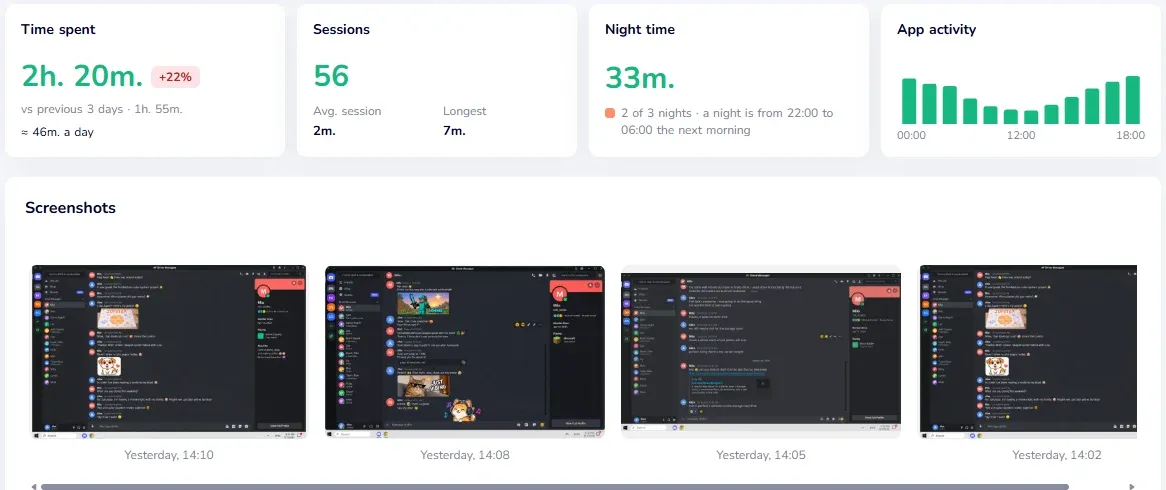
- Open the Discord page in your dashboard. You see time spent, number of sessions, the longest session, use at night between 22:00 and 06:00 and activity by hour, plus screenshots.
- Block Discord when you need to. On Android and Mac you can block the Discord app; on all three systems you can block discord.com in the browser. Every attempt to open it is logged.
- Watch where chats move. The installed apps list shows new messengers with their install date, so a new Telegram or Snapchat doesn’t go unnoticed.
Open the Discord page in the demo
Time in Discord, sessions, night use and screenshots on sample data, the way a parent sees them. Demo opens without sign-up.
How to talk with your child about Discord
- Ask for a tour. “Show me your favorite server” opens more than any setting. You see who’s there and how they talk.
- Agree on three rules. No DMs with people they don’t know offline, no calls after a set time, no clicking “free Nitro” links.
- Explain why people move chats. If someone asks to continue on another app or to keep a secret, that’s a reason to tell you, not to hide it.
- Promise not to overreact. Kids report problems when they know it won’t cost them Discord.
Read also
- Is Telegram Safe? A Parent’s Guide to Risks and Settings
- Gen Alpha Slang: A Parent’s Dictionary (Updated 2026)
- What Is the Scoopz App and Is It Safe for Kids?
FAQ
Not by Discord’s rules: the minimum age is 13. If your child already uses it, connect Family Center, block sensitive content and keep direct messages limited to friends they know offline.
Not through Family Center. It shows who your child messaged or called and which servers they joined, but not the messages themselves.
Use Family Center downtime to block Discord during set hours. To see daily time and night use and to block the app on a specific device, use a tool like KidInspector on Android, Windows or Mac.
Since September 2026 Discord estimates whether a user is 13–17 and applies teen protections: age-restricted servers, content and settings are blocked, while regular chats and calls with friends keep working.
Yes. You can delete the app and block it in the device’s parental controls, or with KidInspector block the app on Android and Mac and discord.com in the browser on Android, Windows and Mac.
Know when Discord takes over the evening
KidInspector shows Discord time by day and by hour, blocks it on Android and Mac when you decide and logs every attempt to open it. Creating an account is free.